A pool pass your staff can trust
EasyPoolPass makes it easy for residents to get in, and hard for anyone else to. Here's exactly how it protects your pool, your residents, and your board's records.
Example pass · live demo
Sunset Cove Pool
Alex Example
Adult Pass · Example
Monday, October 26
The clock ticks every second and the shine keeps moving. A screenshot freezes both.
How Staff Spot a Real Pass
A quick glance at the gate is all it takes.
A Ticking Clock
Today's pass shows the current time, down to the second, in your facility's time zone. If the seconds aren't moving, it isn't a live pass.
A Moving Shine
A soft band of light sweeps across a valid pass, over and over. A photo or screenshot of a pass stays still.
The Resident's Photo
Residents can add their photo, or your staff can add it for them. It appears at the top of the pass, so staff can match the pass to the person holding it.
A New Pass Every Day
Each resident gets one numbered pass per day, dated in your facility's time zone. At midnight an open pass stops ticking and asks the resident to refresh for a new one.
"Not Active" Is Hard to Miss
If a resident or facility is inactive, the pass shows a bold red “Pass not active” banner over a greyed-out card, with no clock and no shine.
Head Counts You Set
Residents enter how many adults and children are coming today, up to the limits your facility sets for each household.
Know the Pass Types
What staff will see at the gate. Names and photos below are made-up examples.
Sunset Cove Pool
Alex Example
Adult Pass · Example
Monday, October 26
Sunset Cove Pool
Sam Example
Child Pass · Example
Monday, October 26
Pass not active
This resident is marked inactive. Please contact the facility office.
Sunset Cove Pool
Jordan Example
Adult Pass · Example
Sunset Cove Pool
Taylor Example
Adult Pass · Example
This pass has expired. Refresh the page for today’s pass.
Screenshot vs. the Real Thing
Same pass. One is a picture, one is live.
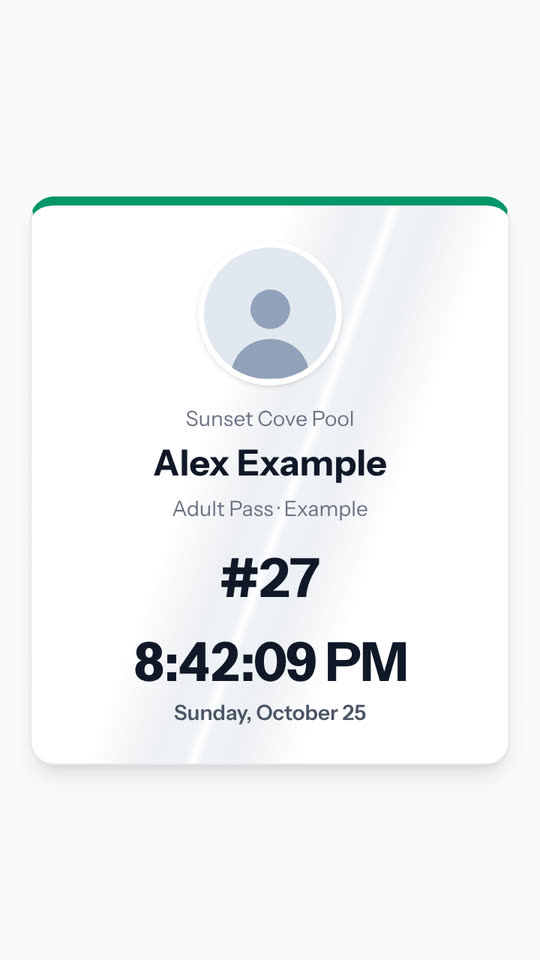
The time never changes.
The seconds tick and the shine sweeps across.
Only Your Residents Get a Pass
Access is tied to the resident list your staff manage.
Sign-in matches your resident list
Residents sign in with your facility code and a phone number that's on file for an active resident. Anyone else is turned away, and repeated failed tries are slowed down.
Optional text-message code
Facilities can also require a 4-digit code texted to the resident's phone. Codes expire after 10 minutes, allow only 5 tries, and are stored scrambled, never as plain text.
Staff approve new residents
Newcomers request access online. Nobody gets a pass until your staff approve the application.
Turn off access in seconds
Moved out or behind on dues? Staff can mark a resident inactive, one at a time or in bulk. They can no longer sign in. A pass that's already open shows “Pass not active” once it's reloaded, and guest passes and head-count changes are refused.
Clear Limits and Records for Your Board
Guest Pass Limits
You decide how many guests a resident can bring per visit, with a daily cap, and how many season guest passes they can buy.
Check-In and Guest Reports
See who came on any date: pass number, resident, address, adults, children, and time. Guest pass reports list each pass with its receipt and amount.
Message History
Texts and emails your facility sends are logged in the Message Center, so there's a record of what went out and when.
Protecting Your Residents' Information
Your facility's data stays yours
Each facility's admins see only their own facility's residents, passes, payments, and messages.
Card numbers never touch our servers
Paid guest passes use Braintree, a PayPal service. Residents enter their card in Braintree's secure payment form, and the price is always set by our server, not the browser.
Protected staff accounts
Admin passwords are stored scrambled (hashed), and sign-in locks briefly after 5 wrong tries.
Encrypted connection
EasyPoolPass runs over HTTPS. Sign-in cookies are secure and can't be read by page scripts, and each sign-in starts a fresh session.
Questions From Your Board?
We're happy to walk your trustees or property manager through it.